PWA 渐进式 Web 应用
PWA简介
定义
- PWA(Progressive web apps,渐进式Web 应用)
- MDN 解释:运用现代的 Web API 以及传统的渐进式增强策略来创建跨平台 Web 应用程序。这些应用无处不在、功能丰富,使其具有与原生应用相同的用户体验优势。
优点
- 可被发现
- 易安装
- 可链接
- 独立于网络
- 渐进式
- 可重用
- 响应性
- 安全的
缺点
- 需要三方库才能调用底层硬件(如摄像头);
- 技术不普及,部分手机屏蔽PWA;
架构模型
核心功能
- Service Worker
- Web App Manifest
- Cache API 缓存
待补充 - Push&Notification 推送与通知
待补充 - Background Sync 后台同步(数据更新)
待补充 - 响应式设计
待补充
Service Worker
特性
- 基于HTTPS 环境
- 是一个独立的 worker 线程
- 可拦截HTTP请求和响应,可缓存文件
- 能向客户端推送消息
- 不能直接操作 DOM
- 异步实现,内部大都是通过 Promise 实现
生命周期
- 注册 -> 安装 -> 激活 -> 废弃
- installing -> installed -> activating -> activated -> redundant
注册
if ('serviceWorker' in navigator) {
window.addEventListener('load', function () {
navigator.serviceWorker.register('/sw.js', {scope: '/'})
.then(function (registration) {
console.log('ServiceWorker registration successful with scope: ', registration.scope);
})
.catch(function (err) {
console.log('ServiceWorker registration failed: ', err);
});
});
}
Web App Manifest
创建 manifest.json 文件
{
"name": "应用名称",
"short_name": "应用展示名称",
"description": "应用详细描述",
"lang": "语言",
"scope":"应用模式下路径范围,超出以浏览器方式显示"
"start_url": "/service-worker/index.html",
"theme_color": "#fff",
"background_color": "#fff",
"orientation": "portrait",
"prefer_related_applications": false,
"icons": [
{
"src": "/img/logo-96x96.png",
"sizes": "96x96",
"type": "image/png"
},
{
"src": "/img/logo-144x144.png",
"sizes": "144x144",
"type": "image/png"
}
],
"display": "standalone"
}
引入 manifest.json 配置
<link rel="manifest" href="manifest.json">
Workbox
缓存策略
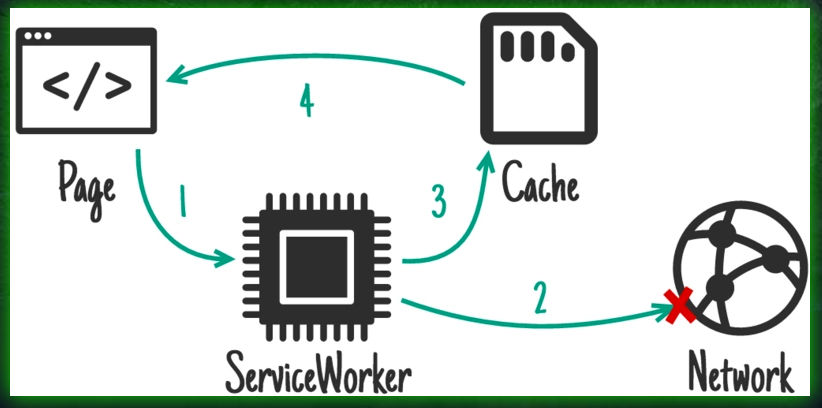
1、Network First(网络优先 )
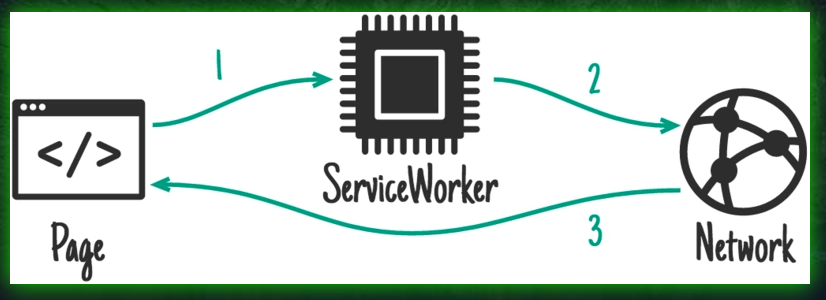
2、Network Only
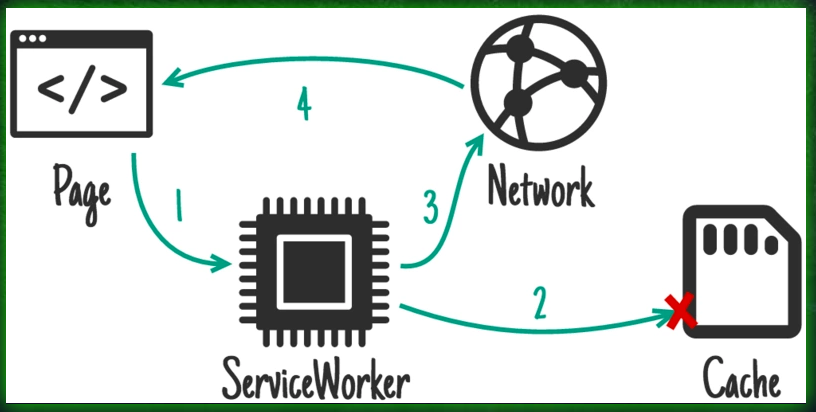
3、Cache First(缓存优先)
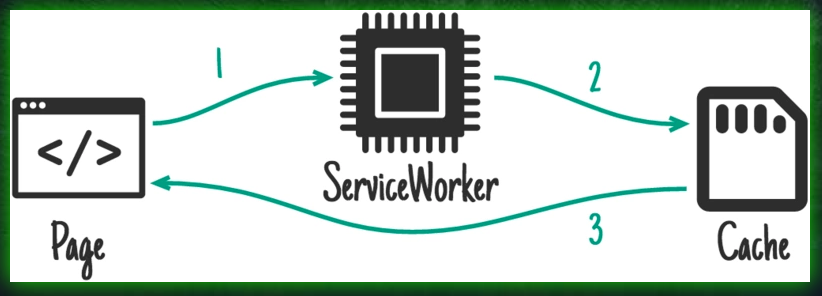
4、Cache Only
5、Stale-While-Revalidate(竞速模式)
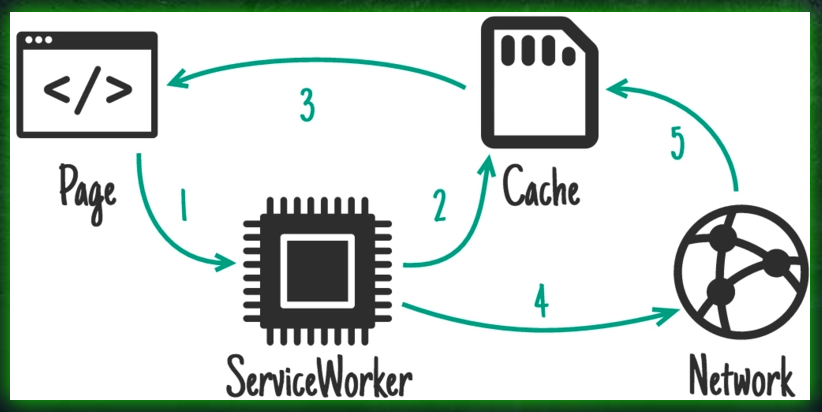
sw.js 示例
this.importScripts('https://storage.googleapis.com/workbox-cdn/releases/4.3.1/workbox-sw.js');
this.workbox.setConfig({ debug: false });
const precacheController = new this.workbox.precaching.PrecacheController();
precacheController.addToCacheList([
'./',
'./index.html',
]);
self.addEventListener('install', event => {
event.waitUntil(precacheController.install());
});
self.addEventListener('activate', event => {
event.waitUntil(precacheController.activate());
});
const cacheName = 'fengling';
this.workbox.core.setCacheNameDetails({
prefix: cacheName,
suffix: 'v1',
precache: `custom-precache-${cacheName}`,
runtime: `custom-runtime-${cacheName}`
});
this.workbox.routing.registerRoute(
/.*\.html/,
this.workbox.strategies.networkFirst({
cacheName: `${cacheName}:html`
})
);
this.workbox.routing.registerRoute(
new RegExp('.*.js'),
this.workbox.strategies.networkFirst({
cacheName: `${cacheName}:js`
})
);
this.workbox.routing.registerRoute(
/.*\.css/,
this.workbox.strategies.staleWhileRevalidate({
cacheName: `${cacheName}:css`
})
);
this.workbox.routing.registerRoute(
/.*\.(?:png|jpg|jpeg|svg|gif|ico)/,
this.workbox.strategies.cacheFirst({
cacheName: `${cacheName}:image`,
plugins: [
new this.workbox.cacheableResponse.Plugin({
statuses: [0, 200],
}),
new this.workbox.expiration.Plugin({
maxEntries: 500,
maxAgeSeconds: 10 * 24 * 60 * 60
})
]
})
);
this.workbox.routing.registerRoute(
/.*\.(?:ttf|woff|eot|otf|fon|font|ttc|woff)/,
this.workbox.strategies.cacheFirst({
cacheName: `${cacheName}:font`,
plugins: [
new this.workbox.cacheableResponse.Plugin({
statuses: [0, 200],
}),
new this.workbox.expiration.Plugin({
maxEntries: 500,
maxAgeSeconds: 10 * 24 * 60 * 60
})
]
})
);
参考&推荐网站
Google Developersopen in new window
PWA 中文文档open in new window
Workbox 指南open in new window
workbox 3.0open in new window
App Shell open in new window
Manifestopen in new window
AppScope 一个pwa应用程序汇总网站open in new window