常用代码
img 无 src 时隐藏
img[src=""],
img:not([src]) {
  opacity: 0;
}
iPhoneX、XS、XR、XSMas 适配
@media only screen and (min-device-width: 320px) and (max-device-height: 568px) and (-webkit-device-pixel-ratio: 2) {
}
@media only screen and (min-device-width: 375px) and (max-device-height: 667px) and (-webkit-device-pixel-ratio: 2) {
}
@media only screen and (min-device-width: 414px) and (max-device-height: 736px) and (-webkit-device-pixel-ratio: 3) {
}
@media only screen and (device-width: 375px) and (device-height: 812px) and (-webkit-device-pixel-ratio: 3),
only screen and (device-width: 414px) and (device-height: 896px) and (-webkit-device-pixel-ratio: 2),
only screen and (device-width: 414px) and (device-height: 896px) and (-webkit-device-pixel-ratio: 3) {
.title {
padding-top: 0.44rem;
}
.bottom {
padding-top: 0.34rem;
}
}
文本溢出...显示
.single {
  overflow: hidden;
  text-overflow: ellipsis;
  white-space: nowrap;
}
.multiple {
  display: -webkit-box;
  -webkit-box-orient: vertical;
  -webkit-line-clamp: 3;
  overflow: hidden;
}
滚动条样式
::-webkit-scrollbar {
display: none;
}
::-webkit-scrollbar-track {
background: transparent;
}
::-webkit-scrollbar-thumb {
border-radius: 20px;
background: #81d4fa;
}
::-webkit-scrollbar-button {
}
::-webkit-scrollbar-track-piece {
}
::-webkit-scrollbar-corner {
}
::-webkit-resizer {
}
自定义字体
@font-face {
font-family: "self-font";
src: url("fonts/xxx.ttf") format("truetype");
}
.word {
font-family: "self-font";
font-size: 50px;
}
css 苹方字体
font-family: PingFangSC-Regular, sans-serif; // 常规体
font-family: PingFangSC-Ultralight, sans-serif; // 极细体
font-family: PingFangSC-Light, sans-serif; // 细体
font-family: PingFangSC-Thin, sans-serif; // 纤细体
font-family: PingFangSC-Medium, sans-serif; // 中黑体
font-family: PingFangSC-Semibold, sans-serif; // 中粗体
font-family: PingFangTC-Regular, sans-serif;
font-family: PingFangTC-Ultralight, sans-serif;
font-family: PingFangTC-Light, sans-serif;
font-family: PingFangTC-Thin, sans-serif;
font-family: PingFangTC-Medium, sans-serif;
font-family: PingFangTC-Semibold, sans-serif;
font-family: PingFangHK-Regular, sans-serif;
font-family: PingFangHK-Ultralight, sans-serif;
font-family: PingFangHK-Light, sans-serif;
font-family: PingFangHK-Thin, sans-serif;
font-family: PingFangHK-Medium, sans-serif;
font-family: PingFangHK-Semibold, sans-serif;
全网页置灰
html {
-webkit-filter: grayscale(100%);
-moz-filter: grayscale(100%);
-ms-filter: grayscale(100%);
-o-filter: grayscale(100%);
filter: grayscale(100%);
filter: progid:DXImageTransform.Microsoft.BasicImage(grayscale=1);
}
点击元素产生背景或边框
a,
button,
input,
textarea {
-webkit-tap-highlight-color: rgba(0, 0, 0, 0);
-webkit-user-modify: read-write-plaintext-only;
}
解决 ios 点击元素出现阴影或闪烁问题
-webkit-tap-highlight-color: transparent;
禁止长按链接与图片弹出菜单
a,
img {
  -webkit-touch-callout: none;
}
禁止 ios 和 android 用户选中文字
html,
body {
  -webkit-user-select: none;
  user-select: none;
}
改变 placeholder 颜色值
::-webkit-input-placeholder {
color: #999;
}
:-moz-placeholder {
color: #999;
}
::-moz-placeholder {
color: #999;
}
:-ms-input-placeholder {
color: #999;
}
input:focus::-webkit-input-placeholder {
color: #999;
}
<input autocapitalize="off" autocorrect="off" />
ios 下输入框默认内阴影
input {
  -webkit-appearance: none;
}
font-size 单位选择
html {
font-size: 62.5%;
}
body {
font-size: 12px;
font-size: 1.2rem;
}
消除 transition 闪屏
.css {
  -webkit-transform-style: preserve-3d;
  -webkit-backface-visibility: hidden;
  -webkit-perspective: 1000;
}
开启硬件加速
.css {
-webkit-transform: translate3d(0, 0, 0);
-moz-transform: translate3d(0, 0, 0);
-ms-transform: translate3d(0, 0, 0);
transform: translate3d(0, 0, 0);
}
css 实现序列帧动画
.cat_animate_right {
width: 100px;
height: 200px;
transform: rotateY(180deg);
background-image: url("./animate.png");
background-size: cover;
background-position: 0 0;
background-repeat: no-repeat;
animation: catPngList 1.3s 1s forwards steps(10);
}
@keyframes catPngList {
100% {
background-position: -1000px 0;
}
}
横竖屏
@media all and (orientation: portrait) {
}
@media all and (orientation: landscape) {
}
<link
rel="stylesheet"
media="all and (orientation:portrait)"
href="portrait.css"
/>
<link
rel="stylesheet"
media="all and (orientation:landscape)"
href="landscape.css"
/>
window.addEventListener('onorientationchange' in window ? 'orientationchange' : 'resize', function() {
setTimeout(() => {
var orientChk = document.documentElement.clientWidth > document.documentElement.clientHeight ? 'landscape' : 'portrait';
if(orientChk =='lapdscape'){
}else{
}, 100);
}
}, false)
vw 定制 rem 布局
html {
  font-size: calc(100vw / 7.5);
}
// 水平翻转
transform: scale3d(1, -1, 1);

// 垂直翻转
transform: scale3d(-1, 1, 1);

// 倒叙翻转
transform: scale3d(-1, -1, 1);
ios 弹性滚动
div {
  -webkit-overflow-scrolling: touch;
}
::selection 文本选中样式
div::selection {
  background-color: #3c9;
}
CSS 高级属性
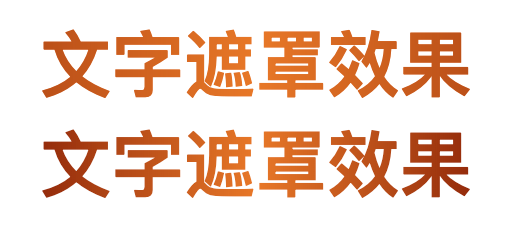
文字渐变效果
<p class="words words1" data-word="文字遮罩效果">文字遮罩效果</p>
<p class="words words2">文字遮罩效果</p>
.words {
  font-size: 40px;
  font-weight: bold;
  text-align: center;
  color: #e87828;
}

// 方式一:借助 before 和 mask 属性实现
.words1::before {
  content: attr(data-word);
  position: absolute;
  z-index: 0;
  left: 0;
  width: 100%;
  height: 100%;
  color: #932b0b;
  -webkit-mask: linear-gradient(to right, #932b0b, transparent, #932b0b);
}

// 方式二:借助 gradient 和 background-clip 属性实现
.words2 {
  background: linear-gradient(90deg, #932b0b 0%, #e87828 50%, #932b0b 100%);
  -webkit-text-fill-color: transparent;
  -webkit-background-clip: text;
}
input {
  caret-color: red;
}
解决 ios 端 z-index 层级问题
.parent {
  position: absolute;
  z-index: 10;
  transform: translateZ(1px);
  .child {
    backface-visibility: hidden;
    -webkit-backface-visibility: hidden;
  }
}